Buyer’s Guides › Live Commerce › Whatnot Tools
The 7 Best Whatnot Seller Tools in 2026, Ranked
Ranked by one metric: GMV impact per dollar for a seller who goes live at least weekly. What actually moves the number at the end of the show.

By Ryan Sorensen
Last updated · 9 min read
Ghost Agent
Real-time show intelligence
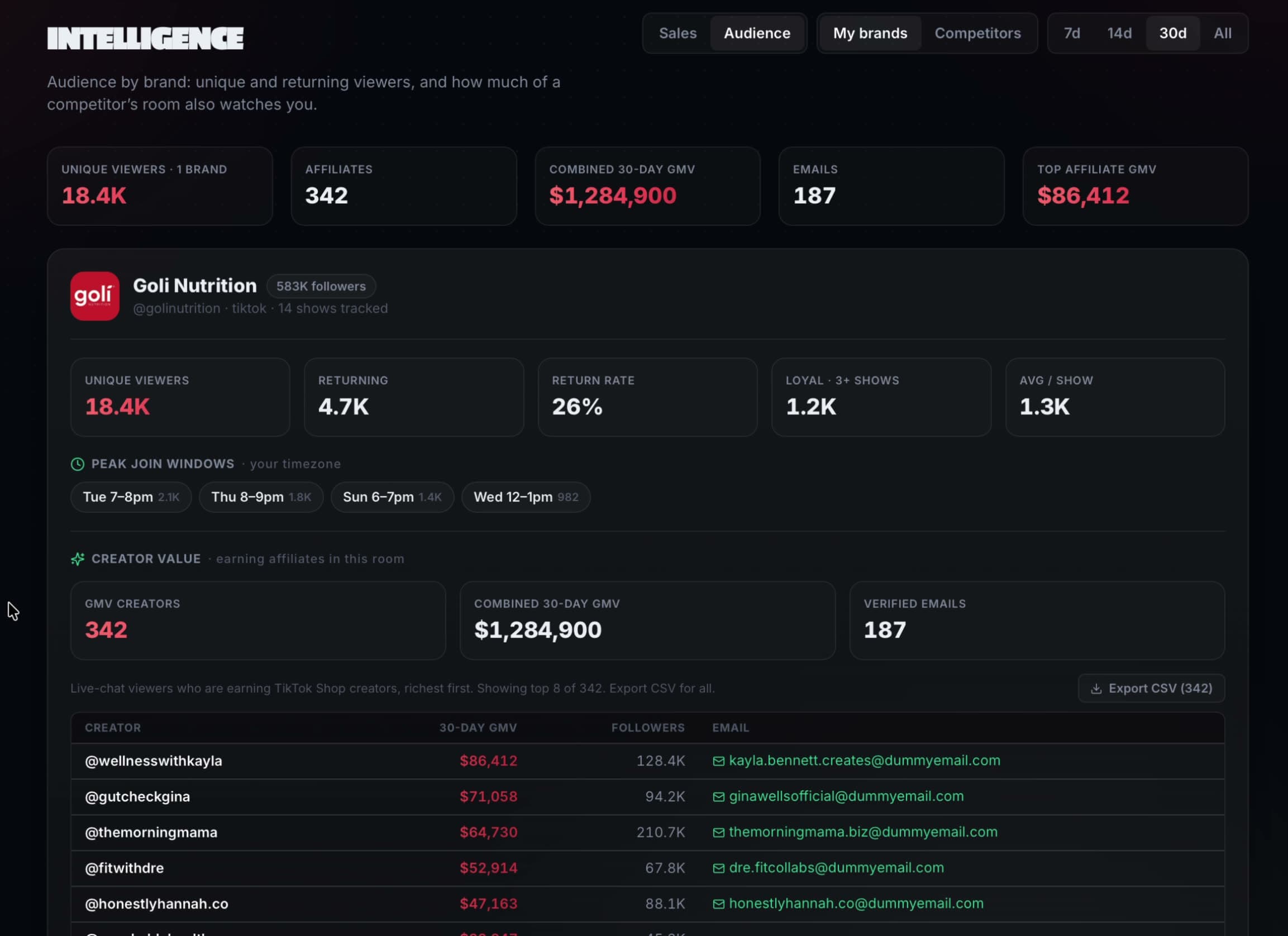
Every other tool on this list helps you before or after the show. Ghost Agent is the only one that works during it. It watches your live show as you host: chat velocity, room turnover, auction pacing. When momentum breaks, it calls the play while the show is still savable, instead of filing it in a report you read the next morning.
It watches the rival shows in your category the same way. So the plays it calls are not generic hosting tips; they come from what is working in rooms like yours, tonight. After you sign off, it writes the post-show report and keeps your season-long numbers.
- Best for
- Sellers going live weekly or more who want GMV up, not just documented
- Standout
- Calls plays on air while the show is running, grounded in rival-show data
- Watch out
- Overkill if you run one casual show a month; start with the free tools below first
- Price
- From $89/mo · 7 days free
7 days free. Cancel anytime.
Whatnot Seller Hub
The native baseline
Master the native dashboard before you spend a dollar anywhere else. Payouts, order management, and the basic post-show numbers all live here, and plenty of sellers never look past the payout tab. The ceiling is structural: it reports what already happened, on your shows only. It is a rear-view mirror. A good one, but a rear-view mirror.
- Best for
- Every seller, from the first show onward
- Standout
- Orders, payouts, and post-show stats with zero setup
- Watch out
- Rear-view only, and it can only ever show you your own shows
- Price
- Free, built in
OBS Studio
Production
The free, open-source standard for stream production. Scene switching, a close-up camera for cards and coins, price overlays, a break screen. One caution learned the hard way by many sellers: production polish is a floor, not a ceiling. Get watchable, then put your energy back into sourcing and pacing.
- Best for
- Sellers ready to step past the single phone camera
- Standout
- Scenes, overlays, and multi-camera on any decent computer
- Watch out
- A real learning curve; budget an afternoon of fiddling before your first OBS show
- Price
- Free, open source
Elgato Stream Deck
Mid-show control
The companion buy for OBS. When you are holding a slab in one hand and a phone in the other, tapping one physical button to swap scenes or fire the giveaway sound is the difference between using your production setup and abandoning it twenty minutes in.
- Best for
- OBS users whose hands are full of product
- Standout
- Physical buttons for scene swaps and sounds while you keep hosting
- Watch out
- It is only as useful as the setup time you invest in programming it
- Price
- About $150 one time
Airtable
Inventory and lot staging
Auction gap creep, the dead air while you hunt for the next item, is an inventory problem wearing a hosting costume. Stage your lots in show order with cost basis attached, log sold prices as you go, and your pacing tightens on its own. A plain spreadsheet works too; Airtable just makes it harder to abandon.
- Best for
- Sellers whose lot count outgrew a notes app
- Standout
- One base for cost basis, lot order, and sold prices
- Watch out
- It is a spreadsheet in a nice outfit; it only works if you keep it current
- Price
- Free tier covers most sellers
Canva
Show graphics and promo
The show that fills up is the show that was announced properly. Covers, lot preview cards, story countdowns. None of it needs a designer, all of it needs to exist. The sellers who treat the 48 hours before a show as a promo window consistently open to fuller rooms.
- Best for
- Announcing shows without hiring a designer
- Standout
- Cover images, lot cards, and story posts from templates in minutes
- Watch out
- Templates read as templates unless you put ten extra minutes in
- Price
- Free tier; Pro around $15/mo
CapCut
Clips and highlights
Your best marketing already happened: it was the bidding war at minute 40 of last night's show. Cut it to thirty seconds, post it where your buyers scroll, and it fills the next room. The tool is easy. The discipline of doing it every morning after is the actual moat.
- Best for
- Turning last night's best moment into tomorrow's full room
- Standout
- Fast vertical-video editing built for TikTok and Reels
- Watch out
- Clipping is a habit, not a tool; the morning after is when it actually happens
- Price
- Free tier
The stack at a glance
| Tool | Job | Price |
|---|---|---|
| 1. Ghost Agent | Real-time show intelligence | From $89/mo · 7 days free |
| 2. Whatnot Seller Hub | The native baseline | Free, built in |
| 3. OBS Studio | Production | Free, open source |
| 4. Elgato Stream Deck | Mid-show control | About $150 one time |
| 5. Airtable | Inventory and lot staging | Free tier covers most sellers |
| 6. Canva | Show graphics and promo | Free tier; Pro around $15/mo |
| 7. CapCut | Clips and highlights | Free tier |
If you want the deeper category-by-category reasoning behind a stack like this, we keep a full guide at Whatnot seller tools, and a breakdown of what the numbers mean at Whatnot analytics.
Start with the layer that works live
46,775
live shows watched
12,706k+
viewers tracked
$384.6M+
creator GMV observed
7 days free. Cancel anytime. Plans from $89/mo.
Frequently asked questions
What tools do I actually need to start selling on Whatnot?
To start: a phone, decent light, and the native Seller Hub. That is genuinely enough for your first shows. Add tools as volume creates problems: production when the single camera limits you, inventory staging when lot hunting slows your pacing, and intelligence when the GMV at stake per show justifies it.
Is Whatnot's built-in dashboard enough?
It is enough to operate: orders, payouts, and basic post-show stats. It is not enough to improve quickly, because it only reports your own shows after they end. It cannot warn you during a show and it cannot show you what working rival sellers are doing differently.
How much does a serious Whatnot tool stack cost per month?
Less than most sellers expect. Five of the seven tools on this list have free tiers that cover a working seller, and the Stream Deck is a one-time purchase. The only real subscription in the stack is the intelligence layer, from $89 a month, which is why we suggest adding it once you go live at least weekly.
Do these tools work for TikTok Live selling too?
Mostly yes. OBS, the Stream Deck, Airtable, Canva, and CapCut are platform-agnostic. The Seller Hub is Whatnot-only, with TikTok's equivalent living in TikTok Shop. Ghost Agent reads both platforms and translates each one's available signals into the same momentum view.